
DDR5 server DRAM delivers roughly 1.5–2× the peak memory bandwidth of DDR4 at a lower operating voltage, supports up to four times the capacity per module, and adds a mandatory second layer of error correction. It is also physically incompatible with DDR4, costs more per gigabyte on some density tiers, and carries slightly higher absolute latency. The real question for everyone else is not “which is faster” but “which one buys the right kind of performance for my workload, at the right moment.”
Below is the full comparison — including the configuration rules that most upgrade guides leave out, and two calculations you will not find anywhere else.
At a glance: DDR5 vs DDR4 server DRAM
DDR4 server DRAM has been the data centre default since 2014. It runs anywhere from 1600 MT/s to 3200 MT/s, ships as RDIMM (registered) and LRDIMM (load-reduced) in capacities up to 256 GB per module using stacked dies, and relies on the memory controller and side-band ECC at the module level for error protection. Today it is the installed base: millions of sockets across Intel Xeon Scalable 1st–3rd generation and AMD EPYC Naples, Rome and Milan platforms.
DDR5 server DRAM was specified by JEDEC in 2020 and reached volume server platforms in 2022–2023 alongside Intel Xeon Scalable 4th generation (Sapphire Rapids) and AMD EPYC 9004 (Genoa). It starts at 4800 MT/s where DDR4 tops out at 3200 MT/s, splits each module into two independently addressable 32-bit subchannels, moves voltage regulation onto the module itself via a PMIC, and adds on-die ECC inside every DRAM chip.
That last point is worth stating plainly up front: DDR5 is not DDR4 running at a higher clock. The channel architecture, the power delivery topology, and the error-correction model are all fundamentally different — and those differences change how you should size and populate a server.
DDR5 vs DDR4: nine dimensions that decide the upgrade
- Data rate and peak bandwidth Per-channel bandwidth is simply data rate × 8 bytes:
On an eight-channel platform that is 204.8 GB/s against 358.4 GB/s — a 75% jump moving from DDR4-3200 to DDR5-5600. On a twelve-channel EPYC socket, DDR5-4800 delivers 460.8 GB/s.
- Channel architecture: two subchannels instead of one
A DDR4 DIMM presents a single 64-bit data bus. A DDR5 DIMM presents two independent 32-bit subchannels (40 bits wide each on ECC RDIMMs, including 8 ECC bits per subchannel). Because each subchannel has its own command and address interface, a memory controller can service two separate requests against one physical module at the same time.
This is the single most underrated change. It is why DDR5 scales so much better on virtualisation and container density: you are not waiting for one wide bus to free up.
- Burst length, banks and prefetch
DDR5 doubles the minimum burst length from BL8 to BL16, which means a full 64-byte CPU cache line can be fetched from a single subchannel access instead of touching both. It also doubles bank groups from 4 to 8 and increases prefetch from 8n to 16n, keeping the internal DRAM core clock manageable while the external interface runs at very high speed.
- Voltage and the PMIC move
DDR4 regulated voltage on the motherboard. DDR5 puts a Power Management IC directly on the DIMM, taking a 12 V input on server-class RDIMMs (5 V on client UDIMMs) and generating VDD, VDDQ and VPP locally. Local regulation improves signal integrity and cuts IR-drop, but it also means the module now dissipates heat it used to offload to the board — typically adding 0.5–1.5 W per DIMM. In dense 2DPC configurations that is real added heat in the DIMM zone, and it deserves airflow attention in your rack design.
- Capacity ceiling per module
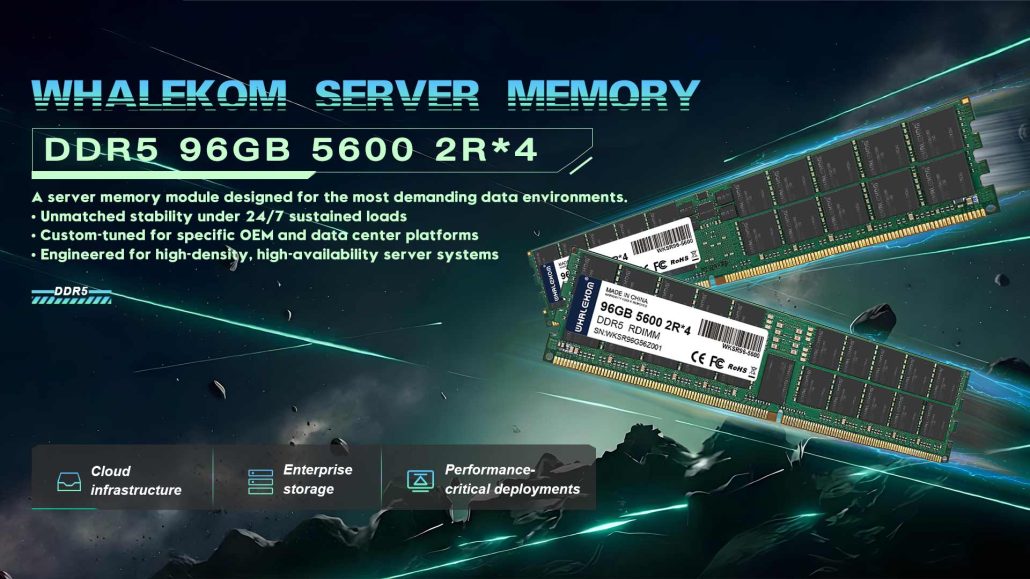
DDR5 supports monolithic dies up to 32 Gb, where DDR4 stopped at 16 Gb. That translates directly into higher per-slot capacity: 64 GB and 96 GB DDR5 RDIMMs are mainstream
This is the most commercially significant difference. Fewer DIMMs for the same total terabytes means fewer slots consumed, fewer failure points, and lower per-GB static power.
- Error correction: on-die ECC is not a replacement
DDR5 mandates on-die ECC inside every DRAM chip, correcting single-bit errors per internal 128-bit row before data ever reaches the memory controller. It also adds Error Check and Scrub (ECS) so the controller can proactively read, repair and log suspect rows.
What on-die ECC does not do is protect data in transit between the module and the CPU. That is still the job of side-band ECC on a ×72-bit RDIMM or ECC UDIMM. If you run mission-critical databases, specify ×4-based modules with full side-band ECC — treat on-die ECC as a second layer, never as a substitute. This is a distinction that even vendor datasheets blur, and getting it wrong is expensive.
- Latency: the honest number
DDR5’s absolute latency is slightly worse. CAS latency in nanoseconds is roughly CL × 2000 ÷ data rate:
So a DDR5-4800 access is roughly 21% slower to *start* than DDR4-3200, even though it moves far more data once it does. For throughput-bound workloads — analytics, in-memory databases, virtualisation, AI inference — the bandwidth overwhelms the latency penalty many times over. For latency-bound workloads such as small-transaction OLTP, the gap is much smaller than the marketing suggests, and you should benchmark your own queries before assuming a win.
- Physical and platform compatibility
Both use 288-pin DIMMs, but the key notch sits in a different position and the pinout is entirely redefined. You cannot plug a DDR4 DIMM into a DDR5 slot, or the reverse. Note also that on DDR5 the module key differs between UDIMM and RDIMM — a further safeguard that did not exist on DDR4.
- Cost and supply risk
The DDR5 price premium over DDR4 has narrowed substantially as production matured, and on high-density 128 GB parts DDR5 is frequently priced at or below the equivalent amount of DDR4 capacity once you account for module count. The more pressing factor is direction of travel: DRAM manufacturers have publicly flagged DDR4 as heading toward end-of-life. Continuing to build a fleet around DDR4 after 2026 means accepting shrinking supply, longer lead times for spares, and rising per-unit cost on every emergency replacement.
Per-core bandwidth: the trend DDR5 actually reversed
Here is the part nobody publishes. Server buying decisions are usually made on raw platform bandwidth, but what your applications actually feel is bandwidth per core — and that number has a much more interesting history.
Two things become obvious once the numbers are laid out this way:
- DDR4’s problem was never absolute bandwidth, it was core count. Milan doubled cores over Ice Lake on the same 204.8 GB/s ceiling and per-core bandwidth collapsed from 5.12 to 3.20 GB/s. That is the “memory wall” in one line.
- DDR5 repaired it — and then core counts started eating it again. Sapphire Rapids restored per-core bandwidth to 6.40 GB/s, the highest in this table. But Bergamo’s 128 cores drop it straight back to 3.60 GB/s, lower than 2017’s Naples.
The practical takeaway: when you specify a DDR5 platform, judge it by cores × channel count, not by the headline MT/s number. A 128-core dense SKU on twelve channels may give your individual VMs *less* memory headroom per thread than a 32-core Naples box from 2017. If your workload is per-thread memory hungry, buy fewer, faster cores — not more of them.
How to configure DDR5 server memory without wasting it
Most published guides stop at comparing specifications. This is the section that actually saves you money.
Populate by channel count, not by slot convenience
Modern server CPUs address memory in channels: eight per socket on Intel Xeon Scalable 4th/5th generation, twelve per socket on AMD EPYC 9004/9005. Buy memory in multiples of the channel count per socket. For a single EPYC Genoa socket that means sets of twelve. Populating 10 DIMMs across 12 channels leaves bandwidth on the table and forces asymmetric interleaving.
Understand the 1 DPC / 2 DPC downclock before you order
Running two DIMMs per channel doubles capacity but usually forces a speed reduction, because the electrical load on the command/address bus doubles. On many Xeon SKUs a second DIMM per channel drops DDR5-4800 operation to 4400 MT/s, and some configurations see DDR5-5600 fall to 4400 as well.
Rule of thumb: start with 1 DPC for maximum bandwidth. Move to 2 DPC only when you genuinely need the capacity — and check the vendor’s population table for the exact downclock on your specific processor SKU before you pay for a speed grade you cannot use. This is the most common way organisations overpay for DDR5: buying 6400 MT/s modules that their CPU will run at 4400.
Ranks and x4 vs x8: do not mix
- x4-based modules support multi-bit side-band ECC and give the strongest data integrity.
- x8-based modules support single-bit ECC and often cost less.
- Mixing single-rank and dual-rank modules, or different densities, across channels can cause memory training failures at POST or silent instability under load — and manifests hardest on exactly the platforms you cannot afford downtime on.
The rules you cannot break
Three reference configurations
Indicative starting points for common workloads — substitute your own validated part numbers from your server vendor’s qualified list.
Real-world performance: what has actually been measured
Vendor benchmark data is useful if you read it carefully. Micron’s published results comparing the previous DDR4 generation against DDR5 on AMD EPYC hardware include:
- STREAM: 189 GB/s on a single-socket 3rd Gen EPYC system with DDR4-3200, versus 378 GB/s on a single-socket 4th Gen EPYC system with DDR5-4800.¹
- Weather Research and Forecasting (WRF): roughly 2× faster on DDR5.¹
- OpenFOAM (CFD): approximately 2.4× relative gain, benefiting from the combination of higher bandwidth and denser cores.¹
- SAP SD: a two-socket system with 128 GB DDR5 modules set a two-socket benchmark record of 201,000 users, exceeding the best published six-socket result.²
These are vendor figures from matching-generation CPU and memory comparisons, not memory-isolated tests. Read them as “this platform generation is much faster than the last one,” which DDR5 helped enable — not as “swap your DIMMs and double your throughput.”
Which workloads actually feel the difference
Big, measurable wins
- In-memory databases and caching layers (SAP HANA, Redis, MemSQL) — capacity per slot plus bandwidth both matter
- High-density virtualisation and VDI — the dual-subchannel architecture directly targets concurrent request queues
- Analytics, OLAP and columnar query engines — throughput-bound, latency-insensitive
- AI inference and embedding lookups — memory bandwidth is often the binding constraint
- HPC and simulation — CFD, finite element, molecular dynamics
Marginal or no difference
- Light web and reverse-proxy tiers — usually bound by network or CPU, not memory
- Log aggregation and archival nodes — storage-bound
- Small-transaction OLTP with a working set that fits comfortably in cache — the ~21% latency penalty can offset the bandwidth gain
When staying on DDR4 is genuinely the right call
Say this out loud and it builds more credibility than any amount of hype: if your servers have 18 months or less of useful life left, your workloads are not bandwidth-bound, and your current capacity is sufficient, upgrading the platform to DDR5 now destroys value. Buy DDR4 spares while supply exists, budget the DDR5 transition into the next natural refresh cycle, and spend the money where it changes outcomes.
Four places where DDR5 moves real money:
- Power per bit. DDR5 operates at 1.1 V against DDR4’s 1.2 V, and local PMIC regulation improves efficiency further. The savings per module are small; across a rack of fully populated servers, and once you count the cooling load you remove, they compound into a line item that finance will notice.
- Cost per GB server rather than per GB module. Because DDR5 doubles usable density per slot, the honest comparison is total cost to reach a target terabyte count — including the DIMMs you no longer need to buy, populate, cool, and eventually replace. On high-density configurations this reframing frequently flips the apparent winner.
- Hardware consolidation. Higher per-socket capacity removes servers from the bill of materials entirely in capacity-bound deployments: fewer chassis, fewer licences per core, less rack space.
- Supply risk. This is the one with a deadline. As manufacturers retire DDR4 capacity, survivors face constrained availability and unpredictable spot pricing for replacements. If your fleet depends on DDR4, forward-buy critical spares now — the cost of carry is far lower than an unplanned platform migration during a failure.
Migration checklist: DDR4 to DDR5 in five steps
- Update BIOS/UEFI first. Several DDR5 stability and training fixes ship in firmware revisions, not hardware.
- Confirm your population map against the server vendor’s documented order — not whichever slots are easiest to reach.
- Validate at full load. Run memtest86+ or your OEM’s diagnostics for a complete pass before deploying anything into production.
- Watch correctable ECC counters through IPMI / iDRAC / iLO for the first 72 hours. A handful of correctable errors during burn-in is expected; a sustained upward trend indicates a marginal module.
- Record temperatures. DDR5 PMICs add heat locally. Confirm DIMM-zone thermals under sustained load rather than at idle.
Frequently asked questions
Is DDR5 backwards compatible with DDR4?
No. DDR5 modules use a different key notch position, different operating voltage and entirely redefined 288-pin pinout, so they cannot be installed in DDR4 sockets. Beyond the physical difference, the memory controllers are generation-specific — no adapter exists.
Can I mix DDR4 and DDR5 DIMMs in the same server?
No, and the mechanical keying prevents the attempt. Even if it were physically possible, a single memory controller cannot drive both generations simultaneously. Mixing requires migrating the whole platform.
Does DDR5 latency make it slower for databases?
It depends on the query shape. DDR5-5600 at CL46 is about 16.4 ns versus roughly 13.75 ns for DDR4-3200 at CL22 — around 19% worse to first byte. Analytical and scan-heavy workloads are unaffected; small random-read OLTP may see little improvement. Benchmark your own workload.
Does DDR5 on-die ECC replace traditional ECC memory?
No. On-die ECC corrects errors inside the DRAM chip before data reaches the bus. It does not protect data travelling between module and CPU. Mission-critical servers still require side-band ECC via ×72-bit RDIMMs or ECC UDIMMs, ideally on x4-based chips for multi-bit correction.
How much memory can a DDR5 server support?
A typical dual-socket DDR5 EPYC 9004 configuration reaches 3–6 TB using standard 128 GB RDIMMs, and considerably higher with 256 GB 3DS modules. Always check your specific platform’s qualified capacity ceiling rather than the theoretical per-slot maximum.
Is it worth upgrading an existing DDR4 server to DDR5?
Usually no, because it is not an upgrade — it is a platform replacement. DDR4 and DDR5 have no shared socket. The right comparison is total cost and capability of a new DDR5 platform versus the remaining useful life and spare-parts risk of your current DDR4 fleet.
The bottom line
DDR5 wins on every dimension that matters for modern data-centre workloads: bandwidth, capacity per slot, power per bit, and error resilience. It loses narrowly on absolute latency and, on some density tiers, still on sticker price.
The decision, though, usually is not really DDR5 versus DDR4. It is “when do I move the platform”, and for most organisations running three-year-plus hardware that answer is now governed less by performance than by DDR4’s end-of-life clock. Build your timeline around supply availability, not just benchmarks.
If you are sizing a DDR5 build, start from the two questions most buyers skip: how many channels does my target CPU actually have, and will my population plan let the DIMMs run at their rated speed? Answer those first and the rest of the specification falls into place.
Whalekom supplies validated DDR5 and DDR4 server memory across Samsung, SK hynix and Micron densities, matched to your platform’s qualified vendor list. Send us your server model and target capacity, and we will return a channel-balanced configuration with current lead times — no guessing whether your population plan will downclock.